# Pandora
Nmap Scan
```
$ nmap -sC -sV -Pn -oN nmap 10.10.11.136
Starting Nmap 7.94SVN ( https://nmap.org ) at 2024-05-16 16:31 +08
Nmap scan report for 10.10.11.136
Host is up (0.040s latency).
Not shown: 998 closed tcp ports (conn-refused)
PORT STATE SERVICE VERSION
22/tcp open ssh OpenSSH 8.2p1 Ubuntu 4ubuntu0.3 (Ubuntu Linux; protocol 2.0)
| ssh-hostkey:
| 3072 24:c2:95:a5:c3:0b:3f:f3:17:3c:68:d7:af:2b:53:38 (RSA)
| 256 b1:41:77:99:46:9a:6c:5d:d2:98:2f:c0:32:9a:ce:03 (ECDSA)
|_ 256 e7:36:43:3b:a9:47:8a:19:01:58:b2:bc:89:f6:51:08 (ED25519)
80/tcp open http Apache httpd 2.4.41 ((Ubuntu))
|_http-title: Play | Landing
|_http-server-header: Apache/2.4.41 (Ubuntu)
Service Info: OS: Linux; CPE: cpe:/o:linux:linux_kernel
Service detection performed. Please report any incorrect results at https://nmap.org/submit/ .
Nmap done: 1 IP address (1 host up) scanned in 8.21 seconds
```
```
$ sudo nmap -sU -sV -Pn -oN udp-nmap 10.10.11.136
[sudo] password for ranay:
Nmap scan report for panda.htb (10.10.11.136)
Host is up (0.042s latency).
Not shown: 999 closed udp ports (port-unreach)
PORT STATE SERVICE VERSION
161/udp open snmp SNMPv1 server; net-snmp SNMPv3 server (public)
Service Info: Host: pandora
Service detection performed. Please report any incorrect results at https://nmap.org/submit/ .
Nmap done: 1 IP address (1 host up) scanned in 1013.53 seconds
```
## Initial Access
### TCP Port 80
There is a website running on port 80.
Upon further inspection, the website does not have anything that is very suspicious.
```
$ gobuster dir -u http://10.10.11.136 -w /usr/share/wordlists/dirb/common.txt -o dirb-gobuster -b 302,404 -k
===============================================================
Gobuster v3.6
by OJ Reeves (@TheColonial) & Christian Mehlmauer (@firefart)
===============================================================
[+] Url: http://10.10.11.136
[+] Method: GET
[+] Threads: 10
[+] Wordlist: /usr/share/wordlists/dirb/common.txt
[+] Negative Status codes: 404,302
[+] User Agent: gobuster/3.6
[+] Timeout: 10s
===============================================================
Starting gobuster in directory enumeration mode
===============================================================
/.hta (Status: 403) [Size: 277]
/.htpasswd (Status: 403) [Size: 277]
/.htaccess (Status: 403) [Size: 277]
/assets (Status: 301) [Size: 313] [--> http://10.10.11.136/assets/]
/index.html (Status: 200) [Size: 33560]
/server-status (Status: 403) [Size: 277]
Progress: 4614 / 4615 (99.98%)
===============================================================
Finished
===============================================================
```
```
ffuf -w /usr/share/wordlists/seclists/Discovery/DNS/namelist.txt -u http://10.10.11.136 -H "HOST:FUZZ.panda.htb" > vhost-result.txt
/'___\ /'___\ /'___\
/\ \__/ /\ \__/ __ __ /\ \__/
\ \ ,__\\ \ ,__\/\ \/\ \ \ \ ,__\
\ \ \_/ \ \ \_/\ \ \_\ \ \ \ \_/
\ \_\ \ \_\ \ \____/ \ \_\
\/_/ \/_/ \/___/ \/_/
v2.1.0-dev
________________________________________________
:: Method : GET
:: URL : http://10.10.11.136
:: Wordlist : FUZZ: /usr/share/wordlists/seclists/Discovery/DNS/namelist.txt
:: Header : Host: FUZZ.panda.htb
:: Follow redirects : false
:: Calibration : false
:: Timeout : 10
:: Threads : 40
:: Matcher : Response status: 200-299,301,302,307,401,403,405,500
________________________________________________
:: Progress: [151265/151265] :: Job [1/1] :: 53 req/sec :: Duration: [0:05:58] :: Errors: 0 ::
$ cat vhost-result.txt | grep 'FUZZ'
```
Even after trying to brute force the directory and virtual host give us no results or anything interesting to take a look.
### UDP Port 161
The first thing to try is to get the community string through brute-force.
```
$ hydra -P /usr/share/seclists/Discovery/SNMP/common-snmp-community-strings.txt 10.10.11.136 snmp
Hydra v9.5 (c) 2023 by van Hauser/THC & David Maciejak - Please do not use in military or secret service organizations, or for illegal purposes (this is non-binding, these *** ignore laws and ethics anyway).
Hydra (https://github.com/vanhauser-thc/thc-hydra) starting at 2024-05-16 17:20:15
[DATA] max 16 tasks per 1 server, overall 16 tasks, 118 login tries (l:1/p:118), ~8 tries per task
[DATA] attacking snmp://10.10.11.136:161/
[161][snmp] host: 10.10.11.136 password: public
[STATUS] attack finished for 10.10.11.136 (valid pair found)
1 of 1 target successfully completed, 1 valid password found
Hydra (https://github.com/vanhauser-thc/thc-hydra) finished at 2024-05-16 17:20:15
```
So the community string is `public`. By using this string, we can try to see if there is any information that can be leaked out.
There is some information that is leaked by using `braa`.
```
$ braa public@10.10.11.136:.1.3.6.*
10.10.11.136:42ms:.0:Linux pandora 5.4.0-91-generic #102-Ubuntu SMP Fri Nov 5 16:31:28 UTC 2021 x86_64
10.10.11.136:41ms:.0:.10
10.10.11.136:42ms:.0:457069
10.10.11.136:41ms:.0:Daniel
10.10.11.136:42ms:.0:pandora
10.10.11.136:42ms:.0:Mississippi
```
However, the password is not mississippi.
After further enumeration with `snmpbulkwalk`, we can see the password for `daniel` in plaintext.
After trying the password, we are able to login into ssh using `daniel` account.
## Getting User
Through `linpeas.sh`, there is a VirtualHost at `localhost:80`.
{% embed url="" %}
### SQLi Vulnerability
However, it does not return a shell so we still need to use the SQLi method. After running sqlmap, we can see the the database name is `pandora` .
Further enumeration using sqlmap will return us all the tables in the database but there is 1 table that stood out which is `tsessions_php`.
Even further enumeration, we can see that this table contains all the session for the user account of `admin`.
After adding the session to the web brower, we are able to log into the FMS. So the next step is to upload a webshell into the FMS.
After that, we can just call the reverse shell using the payload as shown in the image below.
This will return us a shell as the user `matt`.
## Privilege Escalation
However, given that shell we are not able to do much so we will drop our own public key into the user and log in using `ssh`.
### Exploiting SUID binary for PATH variable injection
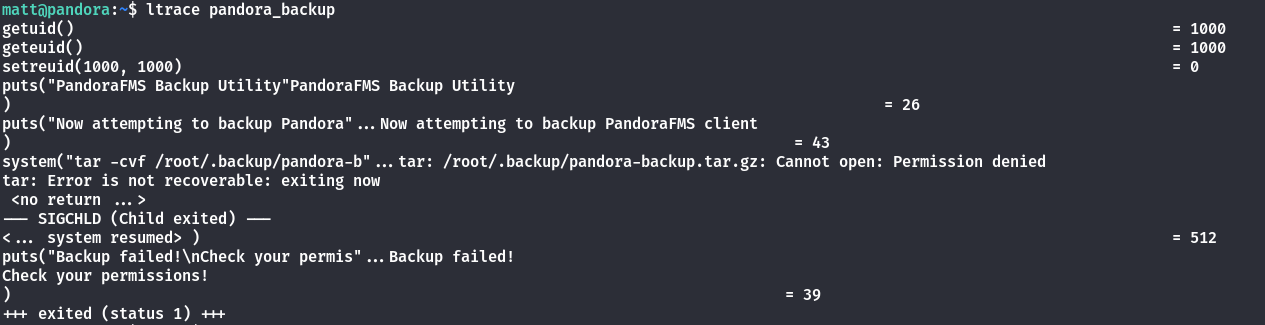
After doing some enumeration about which files that have the SUID bits enable, we realised that pandora\_backup is one of them. During the execution of the binary, we can also see that the binary is using tar.
So we can just exploit the PATH and inject a malicious binary called `tar`
Ensures that the `tar` binary is an executable.
After which after running the binary again, we are able to obtain the root shell and get the flag.