# Busqueda

## Gaining Access

Nmap scan:

```
$ nmap -sC -sV -Pn -oN nmap 10.10.11.208                                            
Starting Nmap 7.94SVN ( https://nmap.org ) at 2024-05-14 20:35 +08
Nmap scan report for 10.10.11.208
Host is up (0.0056s latency).
Not shown: 998 closed tcp ports (conn-refused)
PORT   STATE SERVICE VERSION
22/tcp open  ssh     OpenSSH 8.9p1 Ubuntu 3ubuntu0.1 (Ubuntu Linux; protocol 2.0)
| ssh-hostkey: 
|   256 4f:e3:a6:67:a2:27:f9:11:8d:c3:0e:d7:73:a0:2c:28 (ECDSA)
|_  256 81:6e:78:76:6b:8a:ea:7d:1b:ab:d4:36:b7:f8:ec:c4 (ED25519)
80/tcp open  http    Apache httpd 2.4.52
|_http-title: Did not follow redirect to http://searcher.htb/
|_http-server-header: Apache/2.4.52 (Ubuntu)
Service Info: Host: searcher.htb; OS: Linux; CPE: cpe:/o:linux:linux_kernel

Service detection performed. Please report any incorrect results at https://nmap.org/submit/ .
Nmap done: 1 IP address (1 host up) scanned in 6.83 seconds
```

### Port 80

During the scan, I can see there is a domain name being used in the URL `searcher.htb`.

<figure><img src="https://2790417739-files.gitbook.io/~/files/v0/b/gitbook-x-prod.appspot.com/o/spaces%2FIXulVMkW3AbpCXfmoP1H%2Fuploads%2FjuzH0rGsAF5bbz5hZRAj%2Fimage.png?alt=media&#x26;token=8b8bbe4c-661d-4377-83ff-d8aae8480ece" alt=""><figcaption></figcaption></figure>

So, I added `searcher.htb` to the host files

There is a search feature on the website using the selected search engine that the user used

<figure><img src="https://2790417739-files.gitbook.io/~/files/v0/b/gitbook-x-prod.appspot.com/o/spaces%2FIXulVMkW3AbpCXfmoP1H%2Fuploads%2FmTDLqLg7byF7bldTh7QR%2Fimage.png?alt=media&#x26;token=9e209d08-1b4b-437c-ab3e-d68e32f3f359" alt=""><figcaption></figcaption></figure>

If I scroll down a bit more, I can see this website is powered by `Flask` and `Searchor 2.4.0`

<figure><img src="https://2790417739-files.gitbook.io/~/files/v0/b/gitbook-x-prod.appspot.com/o/spaces%2FIXulVMkW3AbpCXfmoP1H%2Fuploads%2F9ixOqnvEibxdz6u8epPc%2Fimage.png?alt=media&#x26;token=1a9fd9e8-91be-4c24-a94c-182a04c818ca" alt=""><figcaption></figcaption></figure>

### Arbitrary CMD Injection for Searchor

After searching online about `Searchor 2.4.0`, there is an arbitrary command injection

{% embed url="<https://github.com/nikn0laty/Exploit-for-Searchor-2.4.0-Arbitrary-CMD-Injection>" %}

After running the exploit, I have managed to get a reverse shell.

<figure><img src="https://2790417739-files.gitbook.io/~/files/v0/b/gitbook-x-prod.appspot.com/o/spaces%2FIXulVMkW3AbpCXfmoP1H%2Fuploads%2FKz7XrhzKs9LAg0CiFvVP%2Fimage.png?alt=media&#x26;token=0df9a64c-2039-4c07-b490-0093425cf959" alt=""><figcaption></figcaption></figure>

<figure><img src="https://2790417739-files.gitbook.io/~/files/v0/b/gitbook-x-prod.appspot.com/o/spaces%2FIXulVMkW3AbpCXfmoP1H%2Fuploads%2FNjqev0oQn3XkvWBDoSt3%2Fimage.png?alt=media&#x26;token=aaec69b1-cdb7-4d95-a32e-781518114f5d" alt=""><figcaption></figcaption></figure>

After getting the reverse shell, I am in the user `svc` .

<figure><img src="https://2790417739-files.gitbook.io/~/files/v0/b/gitbook-x-prod.appspot.com/o/spaces%2FIXulVMkW3AbpCXfmoP1H%2Fuploads%2FFG12Yh3t3WFUPiD0sgQV%2Fimage.png?alt=media&#x26;token=1255bd03-d92a-493f-93ca-51b8c29efd1c" alt=""><figcaption></figcaption></figure>

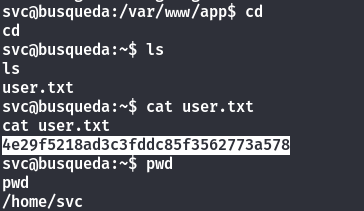
After searching through the machine, the user flag is at the home folder.

<figure><img src="https://2790417739-files.gitbook.io/~/files/v0/b/gitbook-x-prod.appspot.com/o/spaces%2FIXulVMkW3AbpCXfmoP1H%2Fuploads%2FbLvh61ic013dafGz7vGG%2Fimage.png?alt=media&#x26;token=102826b3-fef8-491e-9fcf-f4360ef5633b" alt=""><figcaption></figcaption></figure>

## Privilege Escalation

### Gitea in VirtualHost

After running `linpeas.sh`, there is a virtual host that is running on port 80.

<figure><img src="https://2790417739-files.gitbook.io/~/files/v0/b/gitbook-x-prod.appspot.com/o/spaces%2FIXulVMkW3AbpCXfmoP1H%2Fuploads%2Fa2W5hutPQ0lbfezcD6s5%2Fimage.png?alt=media&#x26;token=02267747-4c01-42e4-98e0-e36c50f516ea" alt=""><figcaption></figcaption></figure>

After adding `gitea.searcher.htb` into the host files, I am able to access the site.

<figure><img src="https://2790417739-files.gitbook.io/~/files/v0/b/gitbook-x-prod.appspot.com/o/spaces%2FIXulVMkW3AbpCXfmoP1H%2Fuploads%2F1kgFikQ9udCVtldCcNbM%2Fimage.png?alt=media&#x26;token=2d0fece9-e5d2-4889-a6d5-fd4600a0d94a" alt=""><figcaption></figcaption></figure>

I can also see the version that it is running on.

<figure><img src="https://2790417739-files.gitbook.io/~/files/v0/b/gitbook-x-prod.appspot.com/o/spaces%2FIXulVMkW3AbpCXfmoP1H%2Fuploads%2FYdYeByRqrqHgpWfikG5Q%2Fimage.png?alt=media&#x26;token=4ae7f57a-e2b3-4708-ab52-db695907dbb2" alt=""><figcaption></figcaption></figure>

However, the exploit requires a username and password

{% embed url="<https://github.com/p0dalirius/CVE-2020-14144-GiTea-git-hooks-rce>" %}

After enumerating more on the machine, there is a config file in the `.git` folder in the `app` folder

<figure><img src="https://2790417739-files.gitbook.io/~/files/v0/b/gitbook-x-prod.appspot.com/o/spaces%2FIXulVMkW3AbpCXfmoP1H%2Fuploads%2FPN2UzbC0UK1ziaatLhZq%2Fimage.png?alt=media&#x26;token=ae230de0-7b4f-4b82-8b9c-6489bbf3f87b" alt=""><figcaption></figcaption></figure>

After logging in with cody's credential, there is this under the repositories in his account. But there is nothing special under this account.

<figure><img src="https://2790417739-files.gitbook.io/~/files/v0/b/gitbook-x-prod.appspot.com/o/spaces%2FIXulVMkW3AbpCXfmoP1H%2Fuploads%2FJg8nO7ahWmSXHiMVSpZv%2Fimage.png?alt=media&#x26;token=12987b61-eaed-4944-81c4-52aafe788a57" alt=""><figcaption></figcaption></figure>

### Able to use sudo on system-checkup script

However, if we use ssh to login into `svc` account with cody's password. There is a command we can use to run as root using sudo.

<figure><img src="https://2790417739-files.gitbook.io/~/files/v0/b/gitbook-x-prod.appspot.com/o/spaces%2FIXulVMkW3AbpCXfmoP1H%2Fuploads%2F3FicoRTnIiW2Yt3LqA4a%2Fimage.png?alt=media&#x26;token=e1ecc280-4f1a-4b69-ae83-150c4f4e66dd" alt=""><figcaption></figcaption></figure>

After playing around, I realised that this file is uised to check the dockers

<figure><img src="https://2790417739-files.gitbook.io/~/files/v0/b/gitbook-x-prod.appspot.com/o/spaces%2FIXulVMkW3AbpCXfmoP1H%2Fuploads%2FYbkfoTYd0TeY1dWHVR3x%2Fimage.png?alt=media&#x26;token=b824472f-0ee0-4fc2-b855-272a0bd2b7d5" alt=""><figcaption></figcaption></figure>

By using the `docker-ps` argument, I am able to see all the dockers that are running.

<figure><img src="https://2790417739-files.gitbook.io/~/files/v0/b/gitbook-x-prod.appspot.com/o/spaces%2FIXulVMkW3AbpCXfmoP1H%2Fuploads%2FH9JhiUqWeZnlUutzSHY6%2Fimage.png?alt=media&#x26;token=313e89ae-4e14-4011-b7af-2a937da607c5" alt=""><figcaption></figcaption></figure>

So I tried to use `docker-inspect` to see if there is any information, but the command return me a syntax usage

<figure><img src="https://2790417739-files.gitbook.io/~/files/v0/b/gitbook-x-prod.appspot.com/o/spaces%2FIXulVMkW3AbpCXfmoP1H%2Fuploads%2FTSIFt0skzpyTA8lThXuk%2Fimage.png?alt=media&#x26;token=591a44f5-300d-49ff-95f4-a562c40c4092" alt=""><figcaption></figcaption></figure>

After reading the website, they used `{{json .}}` as the format. However, it will return a very hard to read `json` format.

{% embed url="<https://docs.docker.com/config/formatting/>" %}

<figure><img src="https://2790417739-files.gitbook.io/~/files/v0/b/gitbook-x-prod.appspot.com/o/spaces%2FIXulVMkW3AbpCXfmoP1H%2Fuploads%2FJR3A5trOp25kEyDWSn9G%2Fimage.png?alt=media&#x26;token=537da8af-2ca8-4da5-8c95-f74ee18aa64a" alt=""><figcaption></figcaption></figure>

However, if I pipe to `jq`, it will return in a nicer format.

<figure><img src="https://2790417739-files.gitbook.io/~/files/v0/b/gitbook-x-prod.appspot.com/o/spaces%2FIXulVMkW3AbpCXfmoP1H%2Fuploads%2FITqTbqDXMbaUZ53AebCd%2Fimage.png?alt=media&#x26;token=97748fee-0bf7-4bb4-8703-c051be72b504" alt=""><figcaption></figcaption></figure>

There are credentials for Gitea MySQL Database

<figure><img src="https://2790417739-files.gitbook.io/~/files/v0/b/gitbook-x-prod.appspot.com/o/spaces%2FIXulVMkW3AbpCXfmoP1H%2Fuploads%2F7XkFtQvXMHSo3Liw3Ykp%2Fimage.png?alt=media&#x26;token=8d2e6a5c-77ae-4dc8-a8e5-7d1e971d33ce" alt=""><figcaption></figcaption></figure>

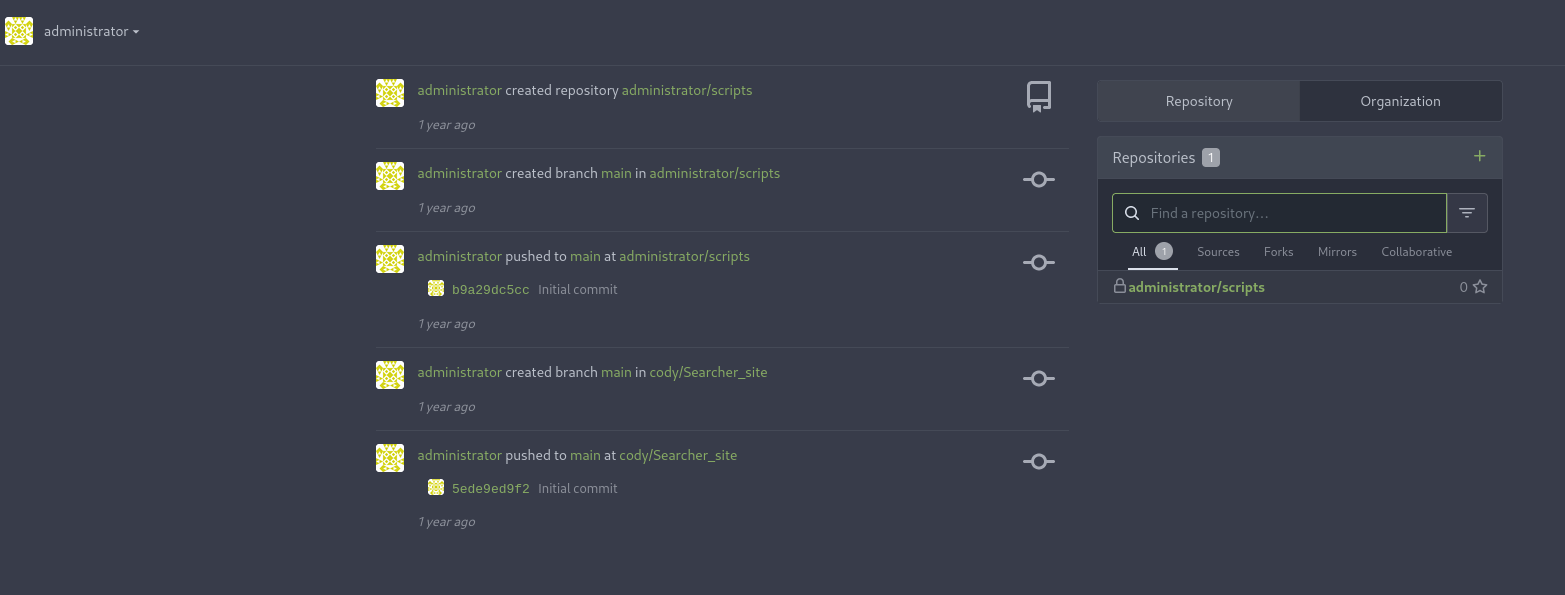
I tried the password for the administrator user and I have managed to get into the administrator account on Gitea.

<figure><img src="https://2790417739-files.gitbook.io/~/files/v0/b/gitbook-x-prod.appspot.com/o/spaces%2FIXulVMkW3AbpCXfmoP1H%2Fuploads%2FFVtDoTvHyaKYrGZlAAFR%2Fimage.png?alt=media&#x26;token=e659593f-8c9b-47e2-b309-15d6c916facd" alt=""><figcaption></figcaption></figure>

<figure><img src="https://2790417739-files.gitbook.io/~/files/v0/b/gitbook-x-prod.appspot.com/o/spaces%2FIXulVMkW3AbpCXfmoP1H%2Fuploads%2FNza1MjHCtrB9p4pOvNaN%2Fimage.png?alt=media&#x26;token=79bb9429-d1a7-48ae-8155-31fecd1541b0" alt=""><figcaption></figcaption></figure>

### Relative Path Vulnerability to gain PE to root

Upon looking at the scripts repo on the administrator account, we can see if the system-checkup.py have any more issues as since this is the only file that we can run as root.

<figure><img src="https://2790417739-files.gitbook.io/~/files/v0/b/gitbook-x-prod.appspot.com/o/spaces%2FIXulVMkW3AbpCXfmoP1H%2Fuploads%2FhfWpZjNgSK7bquoR7fve%2Fimage.png?alt=media&#x26;token=073e28cd-8703-4318-abaf-89eee8be8ca4" alt=""><figcaption></figcaption></figure>

It is running using a relative path which means I can write a malicious `full-checkup.sh` and get a reverse shell as root.

So i created a malicious `full-checkup.sh`

<figure><img src="https://2790417739-files.gitbook.io/~/files/v0/b/gitbook-x-prod.appspot.com/o/spaces%2FIXulVMkW3AbpCXfmoP1H%2Fuploads%2FyqUSAY2qNI9JUTozEn7l%2Fimage.png?alt=media&#x26;token=c3373c23-bcfd-404c-bba6-94997174f092" alt=""><figcaption></figcaption></figure>

After executing, it will return a reverse shell.

<figure><img src="https://2790417739-files.gitbook.io/~/files/v0/b/gitbook-x-prod.appspot.com/o/spaces%2FIXulVMkW3AbpCXfmoP1H%2Fuploads%2FT8W5tcCLM9O7zTGzRDXE%2Fimage.png?alt=media&#x26;token=56dbee3c-c2a2-4d02-bff2-1ee111ba39ca" alt=""><figcaption></figcaption></figure>

<figure><img src="https://2790417739-files.gitbook.io/~/files/v0/b/gitbook-x-prod.appspot.com/o/spaces%2FIXulVMkW3AbpCXfmoP1H%2Fuploads%2FVoBt4AWhHhCt3HExLSGM%2Fimage.png?alt=media&#x26;token=2e26c3db-e4a1-4b14-9be8-59af38c57f82" alt=""><figcaption></figcaption></figure>